
If you use Borneo Schematics for mobile hardware and motherboard repair, you need to know how to properly manage your account and software. Mistakes during registration can cause login errors, and many users get confused about how to renew their existing plans.
This guide gives you all the clear, step-by-step details you need to set up your account, download the software, and renew your license without any confusion.
⚡ Need an Activation Code Instantly?
100% Genuine • Instant Email Delivery • from Mobi Firmware
📑 Table of Contents
1. How to Register a New Borneo Account
If you are a first-time user and have just purchased an activation code, you cannot use the software directly. You must first create and verify an account on the official Borneo website.
Step-by-Step Registration Process:
- Visit the Sign-Up Page: Goto Borneo Schematic Register/Signup official page “Borneo sign up“
- Fill Out the Form: You will see a registration form asking for your Username, Email, Phone Number, Password, and your Activation Code.
- The Username Rule (Very Important): When creating your Username, do not use any special characters (like @, #, $, or spaces). If you use special characters, the system will not register your account. Only use plain letters and numbers (For example: rahul523 or mobilerepair99).
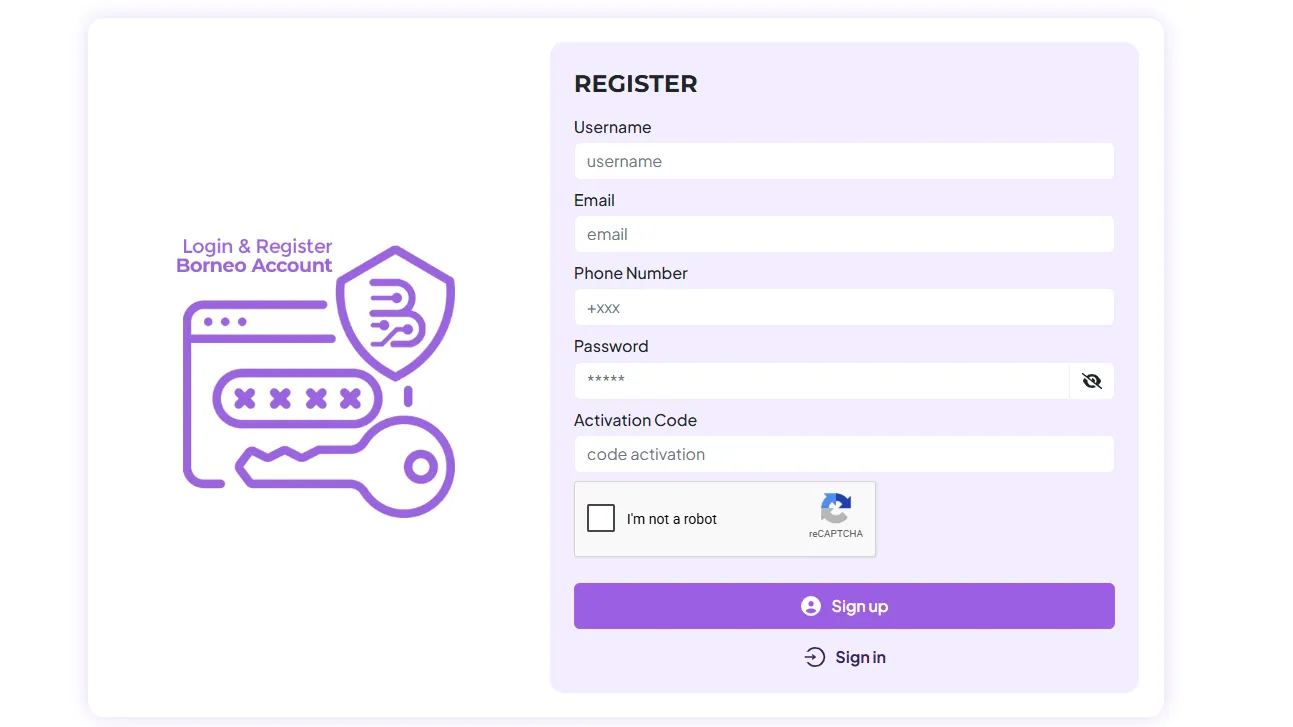
- Submit: Check the “I am not a robot” captcha box and click the Sign-up button.
- Verify Your Email: This is a step many users miss. Go to the email inbox you entered in the form. Look for a verification email from Borneo (check the Spam/Junk folder if you don’t see it). You must click the link inside this email. Your account will only become active after you click this verification link.
2. How to Renew an Expiring Borneo Account
If your current Borneo plan is ending, No need create a new account. Creating a new account means you lose your current validity. You simply need to renew your existing account using a new activation code.
Step-by-Step Renewal Process:
- Visit the Login Page: Goto Borneo Schematic Login/Signin official page “Borneo sign in“
- Log In: Enter your existing Username and Password, solve the captcha, and click Sign In.
- Go to the Renewal Tab: Once you are logged into your dashboard, you will see two main options: ‘Profile’ and ‘Renewal’. Click on ‘Renewal’.
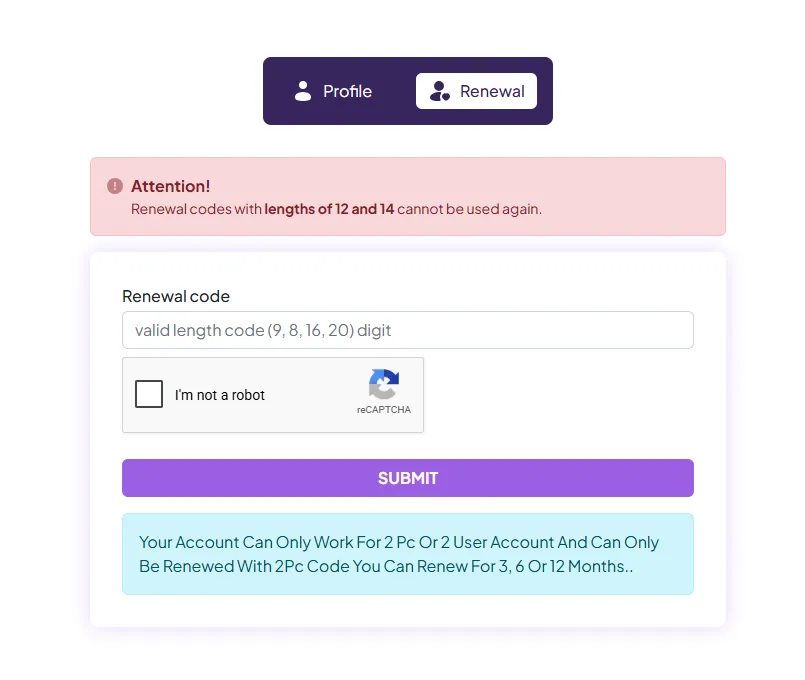
- Apply the Code: Paste your newly purchased Activation Code into the blank box, check the captcha, and click Submit. Your account is now renewed! There is no need for email verification for renewals.
💡 Note on “Stacking” Validity: Many users worry that if they renew early, they will lose their remaining days. This is not true. Borneo stacks your validity. For example, if you still have 15 days left on your current plan and you add a new 6-month code, your new total validity will instantly become 6 months and 15 days. You can renew at any time without losing a single day.
3. How to Download the Latest Borneo Setup
To make sure you have the newest mobile models and hardware tracking solutions, you must install the correct and most updated software version.
Step-by-Step Download Process:
- Find the Download Portal: Goto Borneo Schematic official Download page “Borneo download“
- Select the Right File: On the download page, you will see different tools. Look specifically for the “Full Setup Borneo Schematics” section.

- Choose a Server: You will see buttons for different servers like Mediafire and Mega. Click on the one that works best for your internet speed to download the
.zipor.exeinstaller file. - Install and Run: Once downloaded, extract the file if necessary, run the installer, and follow the on-screen instructions. After installation, open the Borneo app and log in using your registered username and password.
4. Need a New Activation Code? Buy Instantly
If you do not have an activation code yet or need to renew your old account, you can buy a 100% genuine activation code right now. We provide instant email delivery 24/7.
👉 [Click here to Buy your Borneo Schematics Activation Code from Mobi Firmware]
Once you complete your purchase through the link, check your email. Copy the code from the email and follow the Registration or Renewal steps above!
💡 Frequently Asked Questions (FAQs)
Can I use special characters in my Borneo username?
No, you should strictly avoid using special characters like @, #, $, or spaces. Doing so will cause errors during registration. Only use standard letters and numbers.
Will I lose my remaining days if I renew my account early?
No! Borneo stacks your validity. If you renew while you still have remaining days on your current plan, the new time is simply added to your old time. You will not lose a single day.
Why can’t I log in after registering my new account?
After registering, you must verify your account. Check the email address you signed up with (including the spam/junk folder) and click the verification link sent by Borneo. Your account activates only after clicking this link.